Blackview DCM6 Triple Laptop Screen Extender Review
I clipped a triple laptop screen extender onto my MacBook Pro and here's what actually happened.
As an Amazon Associate I earn from qualifying purchases. Some links on this site are affiliate links, which means I may earn a commission if you buy through them, at no extra cost to you. I only recommend products I have actually used or researched.
Quick Verdict
Clipped onto my MacBook Pro and had two extra 14-inch screens ready to go, no drivers, no fuss. It’s a solid piece of gear, not a flimsy gadget, and that’s the whole reason it’s worth the space in your bag.
Buy if you:
- Run multiple monitors at your desk and hate dropping to one screen when you travel
- Want plug and play with no drivers on Mac, Windows, Chromebook, or mobile
- Do work that needs a wide layout, spreadsheets on one side, email on the other
- Want a stand that actually stays put on a desk, not one that slides around
Skip if you:
- Need each screen to run off its own input, this one shares a single set of inputs for all monitors
- Are looking for something built for a laptop under 13 inches or over 17 inches
- Just need one extra screen and don’t want to manage a two-cable setup for three-screen mode
| Screen size | 14.1″ per panel |
|---|---|
| Resolution | 1920×1080 FHD IPS, 60Hz |
| Weight | 2 lbs |
| Thickness | 0.17 in |
| Brightness | 300 nits, 100% sRGB |
| Includes | 2 Type-C cables, USB-C to USB-A cable, HDMI cable, H5-T cable, storage case |
I Clipped It On and Went From One Screen to Three in Minutes
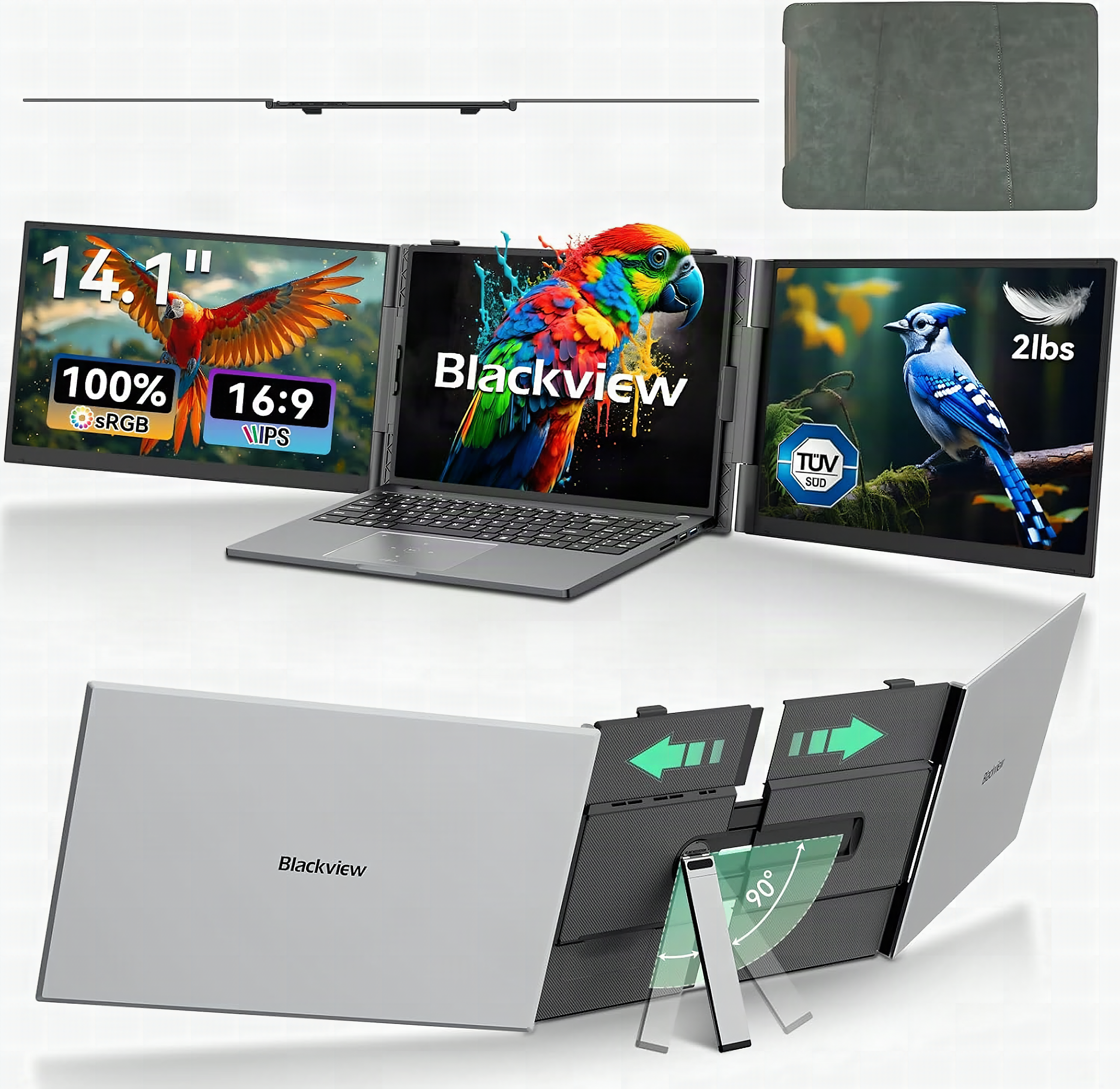
If you’re thinking about buying this triple laptop screen extender, I get why. I’m used to having multiple monitors at home, and going from that down to one screen whenever I travel is one of the more annoying parts of working on the road. The Blackview DCM6 is basically a way to turn your laptop into three different screens. It clips onto your laptop, I used it on a MacBook Pro, and it gives you two extra 14-inch full HD screens that fold out from the sides. All of a sudden you’ve got this big wide workspace without carrying around a giant monitor.
What’s Actually Inside the Kit
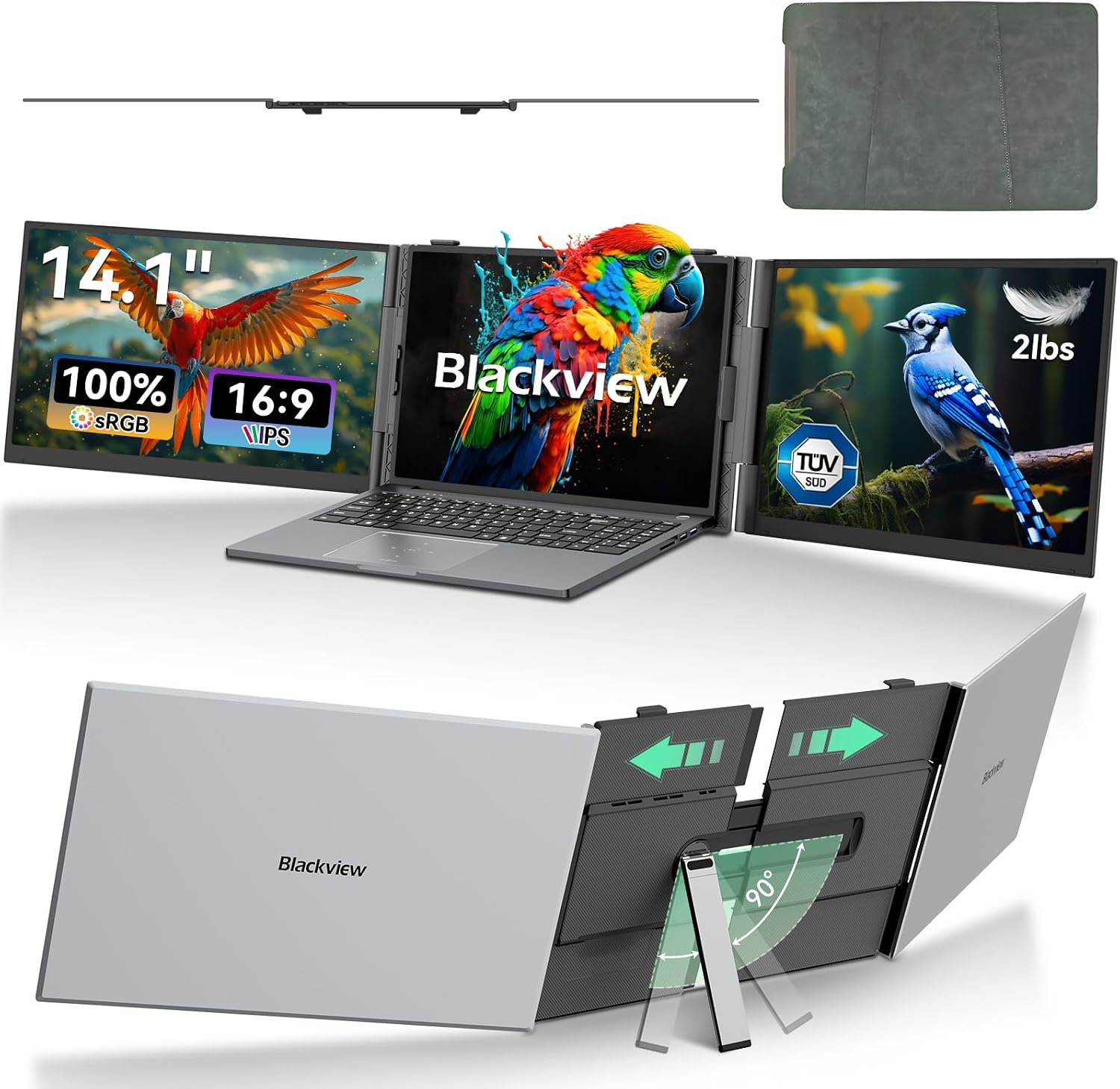
You get two extra 14.1-inch FHD IPS panels running 1920×1080 at 60Hz, plus 300 nits of brightness and 100% sRGB coverage, and the whole extender weighs in at 2 lbs with panels only 0.17 inches thick. That’s the number that surprised me the most, most extenders in this space run heavier than the laptop itself once you add double screens. This one doesn’t feel like that. The box comes with two Type-C cables, a USB-C to USB-A cable, an HDMI cable, an H5-T cable, and a storage case, so you’ve got three separate connection methods depending on your laptop.
The Screens Look Sharp and the Weight Doesn’t Fight You
At 2 lbs total and 0.17 inches per panel, this thing is thinner than most laptop chargers and lighter than a hardcover book, you stop noticing it in your bag almost immediately. Sitting next to a window, the anti-glare coating held up well enough that I didn’t have to rearrange my seat, which is more than I can say for most portable IPS panels I’ve tested. The hinges have real resistance to them; when you fold a panel back, it stays where you put it instead of drifting shut mid-meeting. When you’re done, it folds up real nice, and the back shows you exactly where the wires run so cable management doesn’t turn into a guessing game.
One Input Set for All Three Screens, Not Three Separate Ones
Here’s the thing that’s different from other extenders I’ve seen: each monitor doesn’t have its own set of inputs. You’ve got one set of inputs for all of the monitors together. That’s a cleaner setup than juggling three separate cable runs, and it’s the kind of detail that only shows up once you’re actually using the thing daily, not from reading a spec sheet. The rubberized bottom on the stand also kept it from sliding around on my desk, which is one of the nicer stands I’ve had on a product like this.
Get it now
Blackview DCM6 Triple Laptop Screen Extender
Get the best price on Amazon →As an Amazon Associate I earn from qualifying purchases. Some links on this site are affiliate links, which means I may earn a commission if you buy through them, at no extra cost to you. I only recommend products I have actually used or researched.

The Shared Input Setup Means Learning Three Connection Modes
The single set of inputs is smart, but it also means you have to pick the right connection method for your setup instead of just plugging any screen into any port. There are three ways to hook this up: two Type-C cables direct, an HDMI cable plus a Type-C cable, or the HDMI conversion cable with HDMI-to-USB-C and an external power supply. That’s not a dealbreaker, it worked fine once I figured out which combo matched my laptop, but it’s a step you have to get right the first time or you’ll be swapping cables at your desk wondering why nothing lit up.
Who Actually Needs This Thing
The sweet spot buyer is a road warrior who already runs two or three monitors at a desk and treats every hotel table like a productivity emergency. Spreadsheet on the left, Slack in the middle, browser on the right, that setup is genuinely reproducible here, and it works on MacBooks, Windows laptops, and Chromebooks without installing a single driver. If you only occasionally need a second screen, a single $100 portable monitor is a simpler answer; this is for people who need the full desk experience and can’t leave it at home.
Setup Tips If You’re Buying This
The one setup mistake worth avoiding: don’t just grab whichever cable is on top of the pile. The DCM6 has three connection modes, dual USB-C, HDMI plus USB-C, or the HDMI conversion cable with external power, and the wrong combo produces nothing, no error message, just dark panels. Spend thirty seconds matching the cable method to your laptop’s ports first, and the rest of setup is genuinely plug-and-play; the screens lit up on my MacBook Pro before I’d finished pushing the case out of the way.
Pros
- Only 2 lbs and 0.17 inches thick per panel, noticeably lighter than expected
- Plug and play, no drivers, worked right out of the box on a MacBook Pro
- Screens cut down on glare and the FHD IPS picture is sharp and easy on the eyes
- Rubberized stand base actually keeps it from sliding on the desk
- Single input set for all monitors keeps cable management simpler than other extenders
Cons
- Three different connection methods means you have to match cables to your laptop correctly the first time
- Shared input design means you can’t run each screen off a separate independent source
- Built around 13-17 inch laptops, so it won’t fit smaller or larger machines
Frequently Asked Questions
What laptops is the Blackview DCM6 compatible with?
It works with MacBook Pros, Windows laptops, and Chromebooks, and even some mobile devices, all without needing extra drivers. It’s built for laptops in the 13 to 17 inch range. Plug and play means you connect the cables and the screens just turn on.
Does it need an app or account to work?
No, there’s no app or account needed at all. It’s plug and play through the included cables, no software install and no login. That’s part of why it was ready to work right out of the box.
Is there a warranty on this extender?
Check the current Amazon listing for the specific warranty terms since these can change by seller. Amazon purchases also fall under the standard return window shown at checkout, so you’re covered if it arrives with an issue.
Can I use this with a docking station instead of connecting directly?
The kit includes three specific connection methods, two Type-C direct, HDMI plus Type-C, or the HDMI conversion cable with external power, and those are the combos it’s designed around. Running it through a separate dock wasn’t something covered in testing, so stick with the included cable methods for a reliable connection.
How do I clean the screens without damaging them?
A soft, dry microfiber cloth is the safest bet for IPS panels like these. Avoid anything with alcohol or ammonia since that can strip the anti-glare coating over time. Wipe gently, don’t press hard on the thin 0.17 inch panel.
Will this work for gaming, not just office work?
The 60Hz refresh rate and TÜV SÜD certified low blue light filtering are built more for extended work and viewing sessions than competitive gaming. It’ll display games fine, but if you need high refresh rates for fast-paced titles, this isn’t built for that use case.
Does the extender fold flat enough to carry in a regular laptop bag?
Yes, it folds up and comes with its own storage case, so it’s built to travel alongside your laptop rather than needing a separate bag. That case is worth keeping since it protects the thin panels between uses.
What’s the difference between this and a single portable monitor?
A single portable monitor gives you one extra screen you have to prop up separately, while this clips directly onto your laptop and gives you two additional screens at once for a three-screen total. It’s a bigger jump in workspace without adding a second device to carry and set up on its own stand.
Clicking takes you to Amazon. As an Amazon Associate we earn from qualifying purchases — pricing and availability subject to change.
Get it now
Blackview DCM6 Triple Laptop Screen Extender
Get the best price on Amazon →As an Amazon Associate I earn from qualifying purchases. Some links on this site are affiliate links, which means I may earn a commission if you buy through them, at no extra cost to you. I only recommend products I have actually used or researched.
🛍️ Shop everything in this video
Every product mentioned, in one place — these are affiliate links, so I may earn a small commission at no extra cost to you.
🛍️ Blackview DCM6 Triple Laptop Screen Extender — check price on Amazon →
🛍️ MacBook Pro — check price on Amazon →